
Hey there, cyber-savvy friends! Hacker Cow here, and today we’re tackling a topic that’s as old as the internet itself, but constantly evolving: Phishing, Smishing, and Vishing. These aren’t just fancy words; they’re the cunning tactics cybercriminals use to trick you into handing over your precious login credentials, financial information, and personal data. Think of it as a digital fishing expedition, and you’re the prize catch they’re after!
The Big Picture: What Are They After?
Before we dive into the specifics, let’s understand the ultimate goal of these scams: to steal your information. With your login details, a scammer can gain access to your bank account, email, social media, online shopping, and even your work systems. This can lead to financial loss, identity theft, and a whole lot of headaches.
1. Phishing: The Classic Email Hook
Phishing is the most common form of these scams, typically arriving in your inbox as a deceptive email. The attacker pretends to be a trustworthy entity – your bank, a popular online service, a government agency, or even a colleague.
How it Works:
The email will often create a sense of urgency, fear, or excitement to make you act quickly without thinking. It might say:
- “Your account has been compromised – click here to verify!”
- “Urgent: Payment required for outstanding invoice!”
- “You’ve won a lottery – claim your prize now!”
- “There’s a problem with your delivery, click to reschedule!”
The goal is always the same: get you to click a malicious link or open a dangerous attachment. That link will lead you to a fake website designed to look exactly like the real thing, where they’ll ask for your login details. Once you enter them, boom – they’ve got your credentials.
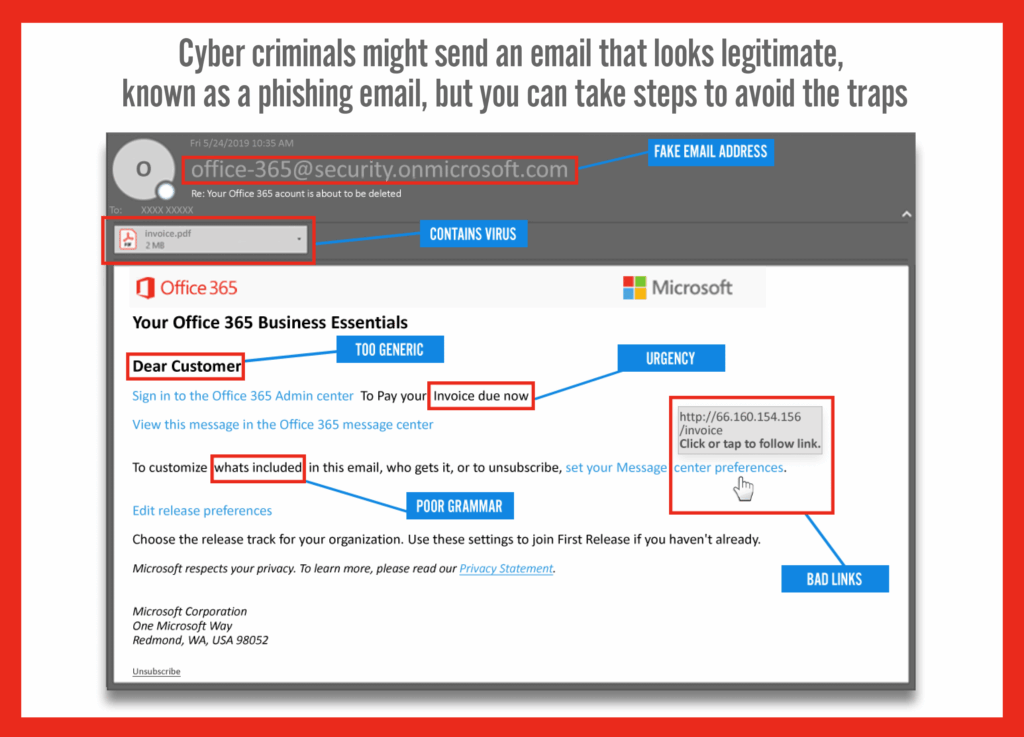
Hacker Cow’s Pro-Tips for Spotting Phishing Emails:
- Check the Sender’s Address: Does
[email protected]really look like Amazon? Scammers often use slightly altered email addresses. - Look for Generic Greetings: “Dear Customer” instead of your actual name is a huge red flag.
- Spelling and Grammar Errors: Professional organizations rarely send out emails riddled with mistakes.
- Hover Over Links: Before you click, hover your mouse over the
link (on desktop) or long-press (on mobile) to see the actual destination. If it doesn’t match the legitimate website, don’t click! - Sense of Urgency/Threats: Scammers want to panic you into action. Legitimate organizations rarely demand immediate action under threat.
2. Smishing: The Text Message Trap
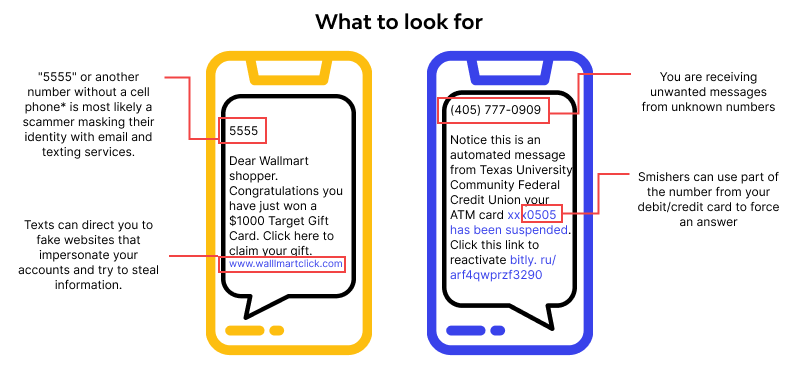
“Smishing” is phishing delivered via SMS (text message). These messages often mimic legitimate alerts from banks, package delivery services, or even government warnings.
How it Works:
You’ll receive an unexpected text like:
- “Your bank account has suspicious activity. Click link to verify.”
- “Your package delivery failed. Update your information here.”
- “You’ve won a gift card! Click to redeem.”
Just like phishing emails, these texts contain a malicious link designed to steal your information or install malware on your phone.
Hacker Cow’s Pro-Tips for Spotting Smishing Texts:
- Unexpected Messages: Did you actually order a package from that company? Are you expecting an alert from your bank?
- Suspicious Links: Be wary of shortened URLs (
bit.ly,tinyurl.com, etc.) from unknown senders. - Requests for Personal Info: Legitimate companies rarely ask for sensitive information via text message.
- Don’t Reply: Replying can confirm your number is active, leading to more scam attempts.
3. Vishing: The Voice Scam
“Vishing” is the voice version of phishing, where scammers use phone calls or voicemails to trick you. They often use “spoofing” to make it look like they’re calling from a legitimate number (like your bank or a government agency).
How it Works:
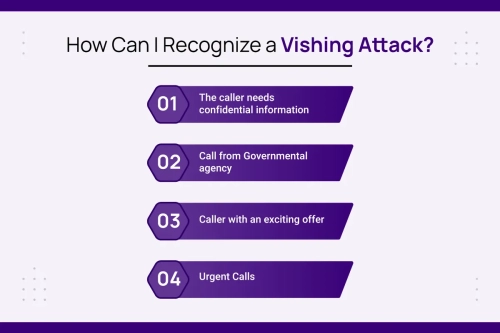
You might get a call or voicemail from someone claiming to be:
- The IRS/Tax Authority: Threatening you with arrest if you don’t immediately pay “back taxes” via gift cards or wire transfer.
- Tech Support: Claiming your computer has a virus and asking you to grant them remote access.
- Your Bank: Warning about “fraudulent activity” and asking for your account details or PIN to “verify.”
Vishing scammers rely on pressure, intimidation, or a false sense of helpfulness to get you to reveal information or perform actions you shouldn’t.
Hacker Cow’s Pro-Tips for Spotting Vishing Calls:
- Unsolicited Calls: If you didn’t initiate the call, be suspicious.
- Demands for Immediate Action: Scammers often create panic. Legitimate organizations give you time.
- Requests for Sensitive Info: Never give out your PIN, full password, or sensitive account numbers over an unsolicited call.
- Payment Demands: Be extremely wary of anyone demanding payment via unusual methods like gift cards, cryptocurrency, or wire transfers.
- Hang Up and Verify: If you suspect a call is a vishing attempt, hang up. Then, independently find the official contact number for the organization they claimed to be (e.g., your bank’s number from their official website or the back of your card) and call them directly to verify.
The Bottom Line: Be the Smartest Cow in the Pasture!
Cybercriminals are constantly refining their tactics, but the core principles of these scams remain the same: they try to exploit your trust and urgency. Your best defense is a healthy dose of skepticism.
Remember these golden rules from Hacker Cow:
- Stop, Look, and Think: Don’t react immediately to urgent messages or calls.
- Verify, Verify, Verify: Always verify the authenticity of a request using official channels (e.g., calling a known number, checking a legitimate website).
- When in Doubt, Throw it Out: If an email, text, or call feels “off,” it probably is. Delete it or hang up.
Stay vigilant, stay informed, and together we can send these digital hunters home empty-handed!